One source: the vendor
Network Scanner is published by LizardSystems, and the only place this course sends you to get it is LizardSystems’ own download page. We do not host the installer, mirror it or repackage it, and we suggest you do not take it from anywhere else either.
The reason is simple. A network scanner is a program you will run on an administrator’s PC, on the inside of your network, and point at your file servers. That is precisely the kind of program an attacker would like you to run a modified copy of. Download sites that “bundle” installers, and anything offering a “cracked” business edition, are a common way for malware to arrive — and the free personal licence means there is no reason to go looking.
Download Network Scanner
Opens LizardSystems’ official download page in a new tab. The download starts from their site.
What you are downloading
These are the facts from the vendor’s download page at the time of writing (September 2026). Check them against the page when you download, and against the file afterwards.
- Product
- Network Scanner by LizardSystems
- Current version
- 21.07, released July 7, 2021
- File name
netscanner_setup.exe- Size
- About 3.0 MB
- Architecture
- 32-bit Windows program
- Signature
- Windows Authenticode signed
- Bundled software
- None — the vendor describes it as a clean installer, no adware
- Registration to download
- Not required; the download starts right away
The version number is calendar-based: 21.07 means July 2021. LizardSystems switched to this scheme with 21.02 in February 2021; earlier releases had numbers like 4.4.221, and the first public release, 1.0.10, came out in January 2010. The vendor’s release history lists every version.
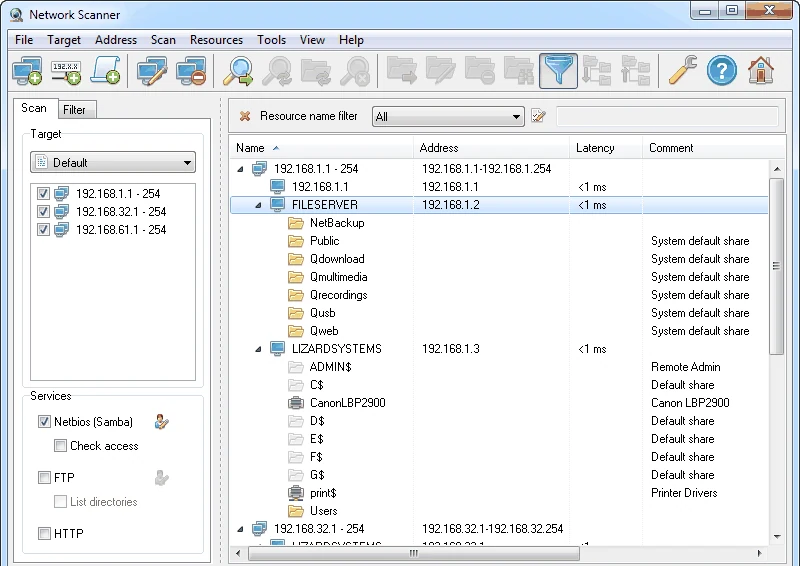
Will it run on your PC?
| Requirement | Vendor’s figure |
|---|---|
| Windows (desktop) | Windows 7, 8, 8.1, 10 |
| Windows Server | 2008 R2, 2012, 2012 R2, 2016 |
| Processor | 1 GHz |
| Memory | 512 MB RAM |
| Disk | 50 MB |
| Display | 800 × 600 or higher |
| Components | Internet Explorer 8 or later component |
| Rights | Administrator rights to install on Windows 7 or newer, or the non-admin install mode (see below) |
| Network | Internet only to register and get updates; scanning works offline |
Two points worth knowing before you install. Since version 4.4.221 the installer can install without administrator rights: it asks which mode you want. And no administrator rights are needed to scan, which is why lesson 11 can run the program as an ordinary user.
Verify the file before you run it
Two checks take under a minute and tell you whether the file you have is the file the vendor published. Both use tools built into Windows.
Check the hash
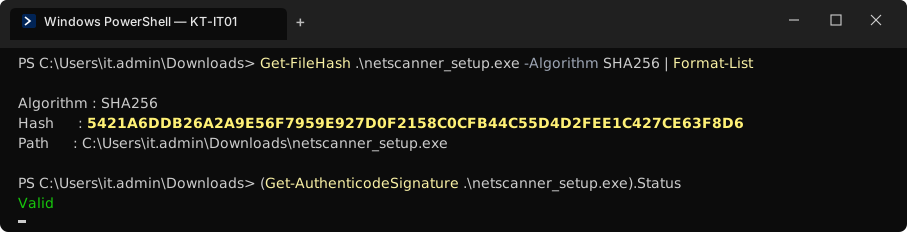
Open PowerShell in your Downloads folder and run
Get-FileHash .\netscanner_setup.exe -Algorithm SHA256. For version 21.07 the vendor publishes this SHA-256 value:5421a6ddb26a2a9e56f7959e927d0f2158c0cfb44c55d4d2fee1c427ce63f8d6PowerShell prints the hash in capitals; the comparison ignores case. Every character must match.
Check the signature
Run
(Get-AuthenticodeSignature .\netscanner_setup.exe).Status. It should printValid. You can also right-click the file, choose Properties and open the Digital Signatures tab to see who signed it.Keep the evidence
Paste both outputs into
C:\LANScan365\notes\install.mdwith the date. If anyone later asks where the scanner on your admin PC came from, you have the answer.
Personal, business and evaluation
Network Scanner is free for some uses and paid for others. Choosing the right licence is part of doing this properly, especially if you are going to put scan results in a report.
| Personal licence | Business licence | |
|---|---|---|
| Use | Non-commercial only | Commercial use: companies, firms, paid IT work |
| Price | Free | US$79.95 per licence, per machine (vendor’s purchase page, September 2026) |
| Term | Perpetual | Perpetual, with one year of free updates |
| Support | — | Email and ticket support |
| How to get it | “Get free license” — register for a key | Buy through the vendor’s purchase page |
Every installation on a separate machine needs its own licence. Business licences are sold through PayPro Global (credit card, PayPal, wire transfer or purchase order) and through resellers; for volume or site licences, contact the vendor. Before you buy, a 30-day evaluation runs with no functional limitations — unregistered copies just show reminder screens.
Kestrel & Vale is an accounting firm, so its use is commercial: one business licence for the IT laptop. A reader working through the course on their own home network can use the free personal licence. Prices change — check the vendor’s purchase page and the licence agreement for the current terms.
Older versions and updates
The public download page offers the current version. Older versions are available to customers through the vendor’s customer portal after signing in. For the course you want the current version; the screenshots and settings described here match it.
A business licence includes a year of free updates. Whichever licence you have, check the releases page from time to time, and verify each new installer the same way — a new version has a new hash.
Download problems
The browser or SmartScreen warns about the file
Likely cause: Some browsers warn about any executable, especially one that is not downloaded often.
Fix: Check the hash and the signature as above. If both are right, the file is the vendor’s; choose to keep it. If either is wrong, delete it.
The download is blocked at work
Likely cause: Your web filter or endpoint protection blocks executables from unknown sites.
Fix: Ask whoever runs the filter to allow lizardsystems.com, or download on an admin PC with the right policy. Do not work around it with a copy from another site.
The file is much smaller or larger than 3 MB
Likely cause: An interrupted download, or not the real installer.
Fix: Delete it and download again from the vendor’s page.
Once the file checks out, carry on with the installation guide.
Get Network Scanner from LizardSystems
Free for personal use; a 30-day evaluation for business. Verify the file, then install.