Free course · 12 lessons · self-paced
Build your office LAN on purpose. Then see it and secure it.
A practical course for the person who looks after a small-office network — often on top of another job. You plan the addresses, set up Windows sharing the right way, scan everything with LizardSystems Network Scanner, and close the gaps the scans reveal.
Three modules, one network you actually understand
Each module builds on the one before. You can dip into a single lesson, but the course is written to be done in order — the findings in Module C only make sense because of the map and the baseline you made earlier.
Build the LAN
Before any scanning: a written map, an address plan, and Windows machines that share files because you decided they should.
See the LAN
Your first scans, read properly. What the tree is telling you, why a host looks offline, and how to notice what changed since last time.
Secure the LAN
Access rights, hidden shares, the view from an ordinary account, and a short report that proves what you fixed.
Who this course is for
You are the person people call when “the shared drive is gone” or the printer stops scanning to a folder. Maybe you are the office manager at a firm of thirty, maybe the one technician at a small managed-service shop, maybe a junior admin who inherited a network with no documentation. You can find your way around Windows and you are not afraid of PowerShell, but nobody ever showed you how to build a small network deliberately and then check it the way an auditor would.
That is what the twelve lessons do. They follow one fictional office from the first sketch of its network to a finished security report, and every step is something you then repeat on your own network.
The office you will follow
Kestrel & Vale is a 35-person accounting firm with a Windows domain
(kestrel.lan), one file server, a backup NAS, two multifunction printers, a camera
recorder and a guest Wi-Fi network. Nothing about it is exotic, which is the point: it has the
same problems as most small offices. By the end of the course you will have found a hidden share
that anyone can write to, a scan folder open to Everyone, an anonymous FTP server nobody
remembered, a printer still on its factory password — and fixed all of them.
Addresses with room to grow
Four segments, reservations for anything people type the address of, and scan targets built straight from the plan.
ScanSee every share on the LAN
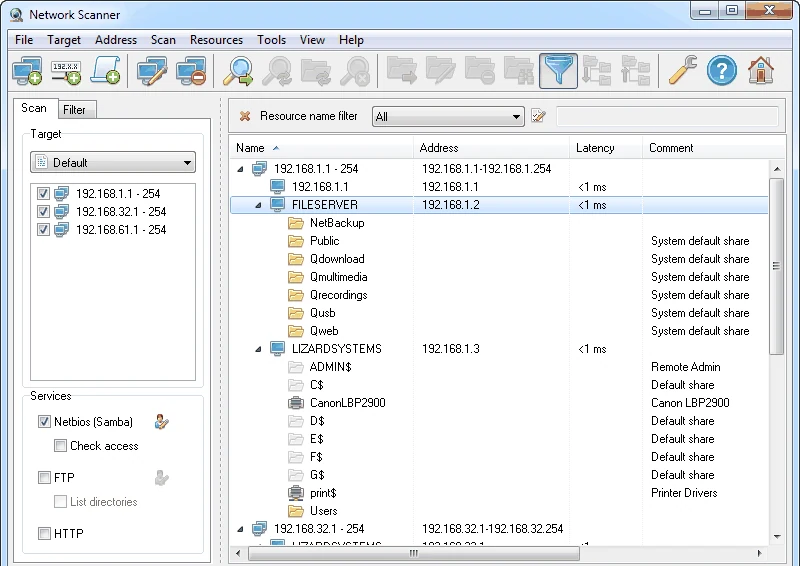
Network Scanner lists NetBIOS shares, including hidden and administrative ones, plus FTP and web services, in one tree.
SecureProve who can write where
Access checks as your admin account and as an ordinary user, then fix and re-scan until the report is clean.
The tool: LizardSystems Network Scanner
Network Scanner is a Windows program from LizardSystems that scans IP ranges, address expressions and lists of computer names, and shows what each computer shares: NetBIOS (SMB) shares including hidden and administrative ones, FTP servers and web servers. It can check whether the current account — or any account you specify — can read or write each share, and it exports results to HTML, XML or TXT. It does not need administrator rights to scan.
It is free for personal, non-commercial use; a business needs a per-machine licence, and a 30-day evaluation has no functional limits. Where the program cannot do something the course needs, we use tools already built into Windows and say so clearly.
Get the installer from the vendor
We do not host files. The button opens LizardSystems’ own download page; our download guide shows how to check the file before you run it.
All twelve lessons
- 0135 minnetwork-map.md
Map the network before you scan it
Write down what should be on the wire — segments, servers, printers, owners — so every scan result has something to be compared against.
- 0240 minip-plan.xlsx
An address plan that survives growth
Carve the private range into segments, keep servers and printers on reservations, and turn the plan into scan targets you can type once and reuse.
- 0345 minshare-register.md
Prepare Windows for file sharing
Network profiles, discovery, the File and Printer Sharing firewall rules and share vs NTFS permissions — set up on purpose, not by accident.
- 0430 mina first saved result
Your first scan with Network Scanner
Build a target from a range, an expression and a name list, pick the services to query, run the scan and save the very first result file.
- 0530 minquestions.md
Reading the results tree
Ranges, computers, shares and their icons, the Latency and Comment columns, and the Filter tab that turns a long tree into a short list of questions.
- 0635 mincheck-profile.md
Online checks and computer names
Ping or TCP connect, timeouts, attempts, NetBIOS or DNS names — tune the checks until silent hosts stop being invisible.
- 0740 minchanges-log.md
Save a baseline and spot changes
Keep result files, read the First scan and Last scan columns, export to HTML, XML or TXT and compare two scans without buying another tool.
- 0835 minservices.md
Find every web console and FTP server
Routers, printers, NAS boxes, camera recorders: every HTTP and FTP service on the LAN, opened, identified and given an owner.
- 0945 minaccess-review.md
Who can read and write each share
Turn on access checking, filter for Write, and decide share by share whether the access you see is the access that was intended.
- 1035 minhidden-shares.md
Administrative and hidden shares
C$, ADMIN$, IPC$, print$ and the shares someone hid with a dollar sign — which are normal, which are risky and which should go.
- 1140 minuser-view.md
See the network as an ordinary user
Scan again with a standard staff account and find out what a normal login — or a stolen one — can reach.
- 1260 minlan-security-report.html
Harden, re-scan and write the report
Close what the lessons found, prove it with a fresh scan, and hand over a short report with the exported results attached.
Before you start
Everything in this course assumes you are working on a network you own or are responsible for, with permission to scan it — ideally in writing. Scanning shares and testing access on someone else’s network is at best rude and at worst illegal. If you are a contractor, get the scope agreed first; lesson 1 includes a one-paragraph authorisation note you can adapt.